
WooCommerce has support for many types of currencies. However, there are many other currencies are not supported including Arab countries’. If your store is using these currencies:
- Moroccan Dirham
- Egyptian Pound
- Iraqi Dinars
- Syrian Pound
- Lebanese Pound
- Jordanian Dinar
- Yemen Riyal
- Libyan Dinar
- Sudanese Pound
- Tunisian Dinar
- Algerian Dinar
- Mauritania Ouguiya
- Emirati Dirham
- Somali shilling
- Djibouti Franc
- Comorian Franc
- Bahraini Dinar
- Kuwaiti Dinar
- Omani Rial
- Qatari Riyal
- Saudi Riyal
Then you need to install a plugin to use them on your store.
Luckily, there is a plugin for this purpose.
Let’s download the plugin here:
And install it on your site.
Now, to use the new currencies, let’s go to WooCommerce->Settings then scroll down to the currencies section:
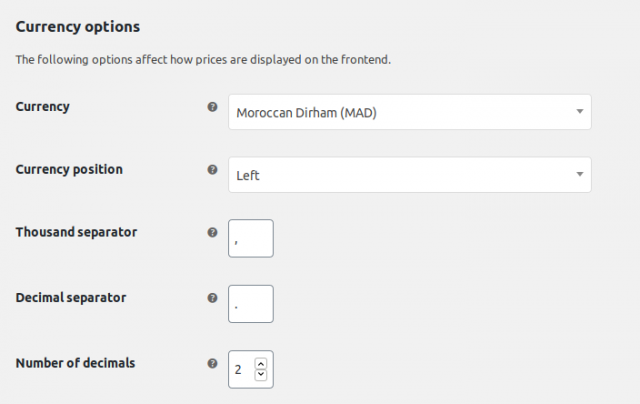
In the currency select box, you can search for your currencies there.
What if you don’t want to use a plugin?
There are cases you only need to add one or two currencies to your site, you may not want to use a plugin. Then, you can follow my tutorials here. By following that tutorial, you can quickly add your own currencies and their symbols without having a new plugin on your site.
I hope you enjoy the tutorial. If you have any questions, don’t hesitate to ask.