On WooCommerce single product pages, you usually see the product’s categories displayed under the add to cart button, like this:

As you can see from the picture, the category of this product is “Business PC”.
What if you want to hide that part? That’s what I’m going to show you right away.
How To Hide Product Category In WooCommerce Product Page In 5 Minutes
The method we are going to use to hide the category in WooCommerce product page is to get the CSS selector of the category and hide it using additional CSS rules, supported by most themes.
The first step would be getting the CSS selector of the category. Here is how you can do this.
Getting the CSS selector of product’s category
On your browser, preferably Chrome, right click on the category then click on Inspect:
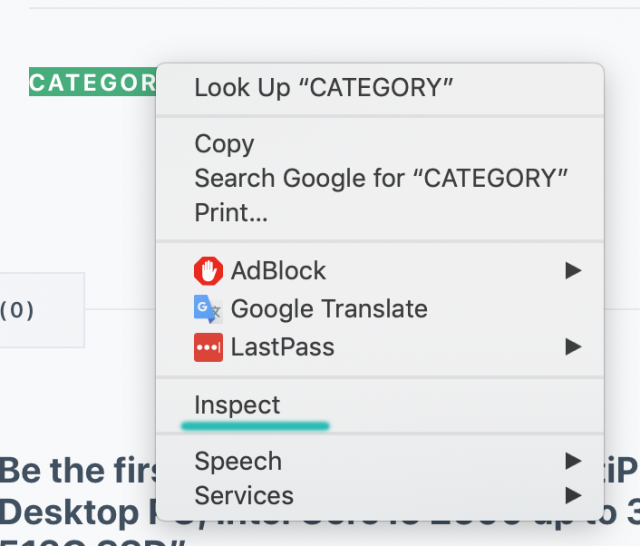
Now, you’ll see a window appears. Depends on your browser settings, you may see the window appear at the bottom, on the right or as a floating window. In my case, it appears at the bottom of the screen.
You should see the element highlighted in the new window:
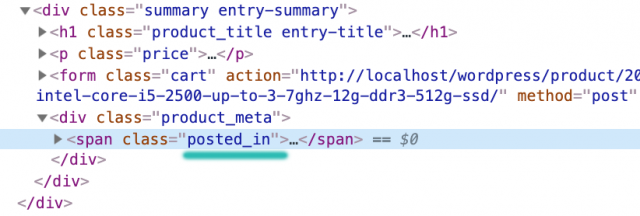
As you can see, our category element has the class posted_in and it’s a child of a div which has product_meta as its class.
NOTICE: The class of these elements maybe different on your site since different themes may have different class name. Thus, make sure you replace the selectors here with the ones that match your own site.
If you know CSS, you’ll probably have no problem writing the selector for this element. In case you don’t know, the selector for the category element is:
.product_meta .posted_in
Now, it’s time to make this element disappear using the customizer.
Hide the category using additional CSS
Let’s go to Appearance->Customize->Additional CSS (This option usually appears at the bottom of the customize panel so you may need to scroll a bit) and enter the following code:
.product_meta .posted_in {
   display: none !important;;
}
Then hit publish.
Now, let’s view the site and sure enough, the category meta is gone:

Conclusion
There you go! It’s the simplest method to hide the category meta in WooCommerce. There could be more methods involving entering some PHP code. I prefer using CSS since it’s quick, simple and I’m not a fan of modifying PHP code on live site.